

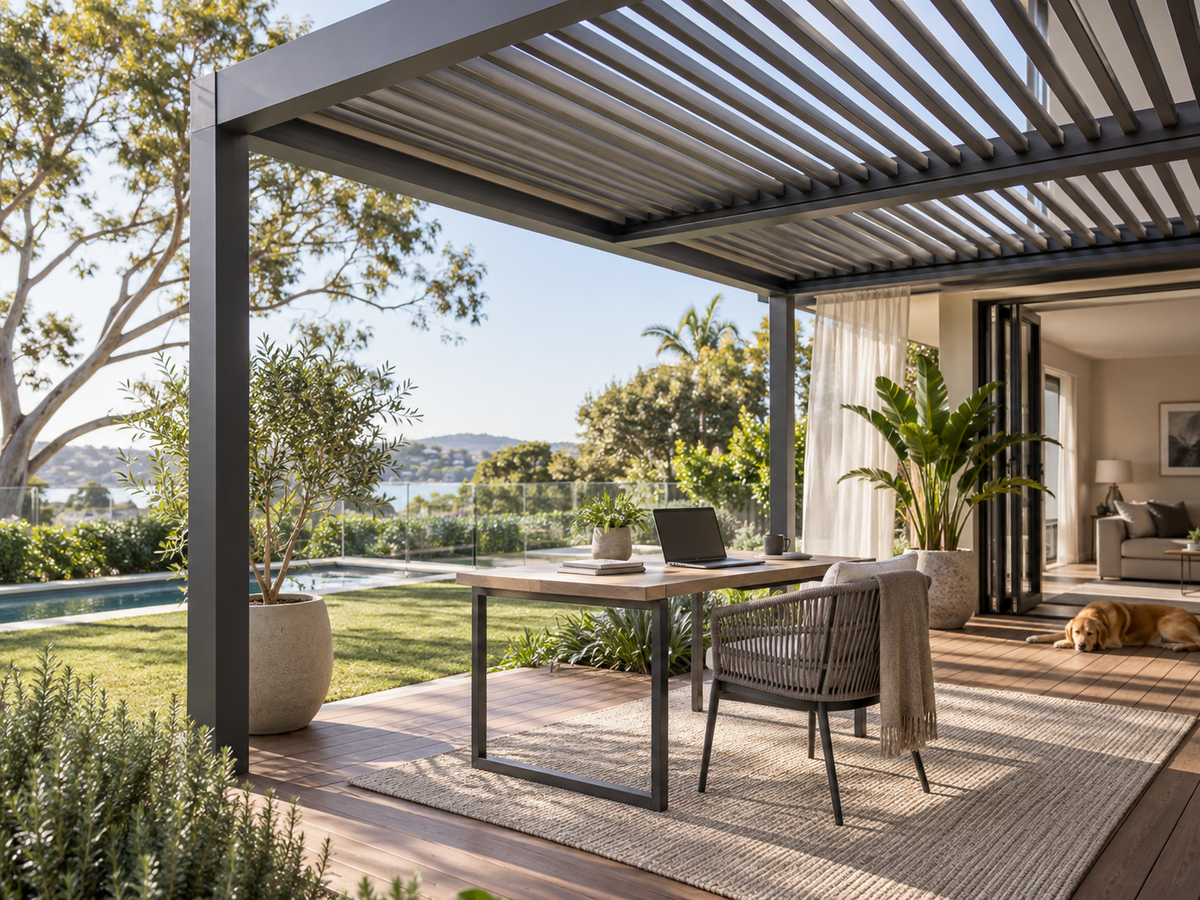
A pergola for an outdoor home office can make a patio more useful for work, but roof coverage alone does not determine whether the desk will be comfortable. Screen reflections, the view behind the monitor and the movement of air around the chair often matter more during a typical workday.
The difference is easiest to see from the actual working position. A layout that feels comfortable at 8 am may become difficult by lunchtime as light reaches the screen from a different angle. More side screening might reduce that glare, yet also block the breeze that made the patio pleasant in the first place. Desk direction, overhead shade and open sides are connected decisions.
Quick answer
The best outdoor workspace is not necessarily the one with the most shade. It is the one where the screen remains readable during working hours without shutting off useful airflow. Sometimes a change in desk direction solves a reflection that additional side screening would only complicate.
THE SPACE AT WORKING HEIGHT
Can the space support useful daytime work?
An outdoor desk does not need to behave like an indoor office to be useful, but the conditions at the seat need to be predictable enough for the tasks planned there. That means looking more closely than simply deciding whether the patio feels sunny or shaded.
A laptop can sit entirely beneath roof cover and still reflect bright sky, a pale wall, paving or a glass door behind the user. At the same time, a desk can look well shaded from across the garden while the person sitting there faces a much brighter background than expected.
The seated eye line reveals two different problems that a view across an empty patio can miss: objects reflected on the display and a bright background that makes the screen uncomfortable to look at. Both affect readability, but they do not always call for the same solution.
Air movement deserves the same site-specific check. Nearby walls, fencing, planting and the house itself can change where a breeze travels. What feels open while standing in the centre of the patio may feel quite different at chair height beside a boundary wall.
The timing of the problem is often more useful than a general description of the yard. A proposed desk may work well early in the morning, then begin reflecting bright paving or open sky later in the working day. That does not automatically mean the whole workspace needs more enclosure.
That pattern may point to a different screen angle, a desk set slightly deeper beneath the roof or a single exposed side. The time of day when the difficulty appears often reveals more about the right solution than the total area of cover.

SCREEN VISIBILITY
Why screen visibility changes throughout the day
An outdoor desk can be perfectly usable in the morning and frustrating by mid-afternoon. A photograph of the empty patio rarely shows this change. The actual laptop or monitor, viewed while seated at the times the space will be used, gives a much clearer picture than a quick inspection on an overcast day.
Screen visibility is not simply a question of how bright the device can become. Reflections and the brightness of the surrounding view can interfere even when the display sits beneath a shaded roof. Where the light comes from is often the more useful clue.
Reflections on the display
Reflections are often easiest to notice in darker parts of a display. Open sky, windows, polished surfaces and light-coloured paving may appear on the screen even while the laptop itself is shaded.
A small change to the usual screen angle, chair position or desk direction can sometimes shift a bright reflection out of view. Moving the device further under the roof may help as well, although that does not address every source of reflected light.
If a troublesome reflection moves off the display quickly, the issue may be directional rather than a lack of roof coverage. That is important because permanent side screening should not be the first response to a problem that could be reduced by a small workstation adjustment.
Brightness behind the screen
The view immediately beyond the screen matters just as much as what is reflected on it. Open sky, sunlit masonry, pale fencing or reflective glazing can make that part of the patio much brighter than the display itself.
The screen itself may technically remain shaded, but the contrast between the display and the surrounding view can still make the workstation awkward to use. Rotating the desk may place a darker garden, shaded wall or less reflective area behind the display.
Photographs taken from seated eye level at different times can help compare these background conditions later, although direct observation is still more reliable for judging reflections on the display.
A useful screen test needs three observations
A screen position that works before lunch may behave quite differently later in the day. The most useful layout is one that remains workable across the hours the desk will actually be occupied, not one that looks comfortable for a few minutes.
DESK ORIENTATION
Why desk orientation matters before extra screening
Seat direction changes the relationship between the screen, the sun, nearby reflective surfaces and the user's field of view. It is therefore one of the most useful variables to test before adding permanent side elements.
A desk that aligns neatly with a wall may look right from inside the house yet face bright sky later in the day. In another layout, a reflective window directly behind the chair may be the bigger problem. Visual symmetry is not always the best guide to screen comfort.
A modest rotation can change both the reflections on the display and the brightness behind it. The better orientation also leaves room to pull out the chair and move between the house and garden, so the desk does not solve one problem by creating another.
Small adjustments can make a difference
A change in chair position or screen angle may be enough to reduce glare. These small, reversible adjustments are worth understanding before the design commits to permanent side screening.
Consider a laptop facing a bright section of garden. Turning the desk by a modest angle may place a shaded wall behind the display and move the bright sky out of the main reflection path. In another backyard, facing across the patio rather than directly outwards may give the screen a calmer visual background.
The desk-and-chair footprint still matters. Moving a monitor further beneath an outdoor pergola may reduce overhead light, but the chair needs room to move and the desk should not obstruct the route between the home and garden.
Also consider how often the workstation will be moved. A lightweight laptop setup can tolerate more day-to-day repositioning than a monitor, docking station and larger desk. If the intended setup is relatively fixed, it is worth spending more time finding a stable direction before the outdoor area is arranged around it.
A shared outdoor television area has to work for several viewing positions. A home-office desk, by contrast, can usually be oriented around one person and one screen, making even a modest directional change worthwhile.
SHADE AND AIRFLOW
Balance shade with daytime airflow
More enclosure is not automatically better for outdoor work. If a recurring reflection comes from one side, the obvious reaction may be to block that side completely. The difficulty is that the same opening may also be where useful air enters the working zone.
Air movement at chair height can be surprisingly different from the breeze felt in the centre of a patio. A wall, solid fence, high-backed chair, planter or privacy screen may interrupt it before it reaches the person working.
Where practical, repeat the observation on more than one day. One unusually still or windy period should not be treated as a permanent description of the site. What matters is whether there is a recognisable air path during the working hours that matter most.
Where the light enters determines which change is likely to help. The P180's adjustable louvres can manage some overhead sunlight as the day changes, but they cannot remove every reflection from low-angle side light or a bright surface behind the monitor. In those cases, desk orientation may matter more than additional roof coverage.

At seated height, a few ordinary details of the garden tend to shape the airflow:
- which side the breeze normally reaches first;
- whether the chair sits directly behind a wall, fence or other solid boundary;
- whether the glare problem occurs during the same hours when airflow is most useful;
- whether moving the desk could preserve an open side;
- whether planting or furniture is already changing the air path at seated height.
For a freestanding pergola, this assessment can be particularly useful before the workstation position becomes fixed. The open sides, surrounding garden and desk direction can be considered together rather than treating the office furniture as something to fit into a completed space afterwards.
The trade-off will also change with weather and season. An outdoor workspace should not be treated as a constant-temperature office simply because it sits beneath roof cover. It remains an outdoor environment.
The result is rarely a perfectly controlled environment, nor does it need to be. What matters is reducing avoidable glare without losing the openness and breeze that make working outside appealing.
BEYOND THE ROOF
What the pergola cannot protect by itself
A covered workspace is still outdoors. Overhead cover does not confirm that a laptop, monitor, charger, power board, docking station or other electrical equipment is suitable for outdoor exposure. Treat equipment protection and electrical planning as separate decisions rather than assumptions created by the presence of a roof.
Weather changes also affect how practical a permanent setup will be. A laptop can usually be taken indoors quickly; a larger monitor and docking station may be less convenient to move, especially if the route back into the house is narrow or obstructed.
Power arrangements need to suit the actual desk location, too. Extension leads across a frequently used path can create a hazard, while sockets and equipment intended for indoor use may not be appropriate outdoors. Fixed electrical work and equipment suitability require the relevant manufacturer guidance and qualified professional advice.
Pergola planning can address
The position of the covered zone, roof relationship, open sides, desk footprint, circulation around the chair and the relationship between the workstation and surrounding light.
It does not confirm
That office electronics are weather-safe outdoors, that the area will remain at a fixed temperature or that a particular electrical arrangement is appropriate for the property.
It is also worth defining the practical edge of the workspace. A desk directly beside an exposed side may experience different light and weather conditions from a position deeper inside the covered footprint. Use the proposed desk location as the reference point rather than discussing only the overall pergola area.
For a product comparison, a short record of the site is more revealing than a request for “more shade”: normal working hours, the time glare becomes troublesome, a preferred desk direction and alternative, the direction of useful airflow and photographs taken from the chair.
These details make it easier to explore the P180 configuration in context, weighing the covered area against screen position and airflow rather than treating a roof as a substitute for an indoor office.

Planning reference
P180 for a defined outdoor work zone
Compare P180 against the location already tested, including the desk footprint, chair clearance and sides that need to stay open. Its freestanding and wall-mounted configurations suit different layouts, while the choice between manual and motorised louvres affects how the roof can be adjusted during the working day. Check that the selected arrangement supports the screen position identified during the site test.
An occasional laptop user and someone working outdoors with a fixed monitor may value different adjustments. The practical routine should shape the configuration, not the other way around.
Explore P180Where the office is one part of a larger backyard project, discover EVERPERGO outdoor options with both everyday living and the demands of screen-based work in mind.
A pergola may also serve dining and entertaining, but an office brings a distinct requirement: one person needs a readable screen, room to sit comfortably and a usable setup through the hours they actually work.
Next step
Choose a pergola around the way you work
A few photographs from seated eye level, the usual working hours and two realistic desk orientations can make a product comparison much more meaningful.
Alongside the patio dimensions, these details help show which P180 layout and louvre adjustment options fit the way the space will be used—rather than making maximum coverage the only priority.
COMMON QUESTIONS
Outdoor home office pergola FAQs
Should I test the screen at more than one time of day?
Yes. Test during the hours when the workspace will genuinely be used. A screen position that works in the morning can develop reflections or much stronger background contrast after the sun moves. More than one test helps show whether the problem is directional, temporary or persistent.
Will additional shade remove all screen reflections?
Not necessarily. Reflections can come from bright sky, windows, paving, walls and low-angle light as well as overhead sun. Identify the source before increasing cover. Turning the desk or changing the screen position may solve a reflection that additional roof coverage would not address.
Why does seat direction matter for laptop work?
The screen reflects whatever sits in its light path, while the brightness immediately behind the display affects the overall viewing condition. Rotating the workstation can move a bright surface out of the reflection path and place a calmer background behind the device without changing the pergola footprint.
Does overhead cover make office electronics weather-safe?
No. Overhead cover alone does not confirm that a laptop, monitor, charger, power board or other electronic equipment is suitable for outdoor exposure. Follow the relevant equipment manufacturer's requirements and obtain appropriate professional advice for electrical planning.
Share:
Pergola Around an Outdoor TV: Glare, Viewing Angles and Weather Planning
Pergola for a Dog-Friendly Backyard: Shade, Ventilation and Clear Movement Paths